Database Owner? What user owns your database?
Who owns that database? A quick check of the owner of most databases will likely reveal that the databases are either owned by sa, or… Read More »Database Owner? What user owns your database?
Database Health Monitor is an inexpensive yet powerful tool developed by Stedman Solutions to help SQL Server administrators monitor and maintain their database environments effectively. Designed with both usability and performance in mind, it offers a comprehensive suite of features to identify, diagnose, and resolve SQL Server issues before they escalate. This makes it an essential tool for DBAs and IT teams who prioritize database reliability and performance.
The tool provides a wealth of functionality, including real-time monitoring of critical SQL Server metrics such as wait statistics, index fragmentation, and resource utilization. Its intuitive dashboards allow administrators to gain a quick understanding of their server’s health, while detailed reports help track trends and identify areas needing optimization. With built-in tools for detecting common database issues like missing or unused indexes, blocking, and deadlocks, Database Health Monitor empowers users to make data-driven decisions to improve database performance.
Database Health Monitor excels at identifying performance bottlenecks, including poorly performing queries and inefficient indexes. The tool provides insights into long-running queries, high CPU-consuming operations, and indexes that may be missing or causing performance drag due to fragmentation. By addressing these issues, organizations can significantly boost application performance, reduce resource consumption, and ensure their SQL Servers are operating at peak efficiency.
One of the key benefits of Database Health Monitor is its ability to detect and report potential problems proactively. It identifies issues like high disk latency, excessive transaction log growth, and databases running out of space—helping DBAs address problems before they lead to downtime. The tool’s real-time monitoring capabilities make it an invaluable resource for maintaining uptime and ensuring business continuity.
From small businesses managing a single SQL Server instance to large enterprises with complex database ecosystems, Database Health Monitor caters to a wide range of needs. It supports capacity planning by analyzing trends in resource utilization and provides actionable recommendations to optimize your SQL Server environment. The tool is also widely used for troubleshooting, offering deep insights into performance problems and pinpointing their root causes.
Database Health Monitor was built by the experienced team at Stedman Solutions, with insights from decades of managing SQL Server environments. This expertise is evident in the tool’s practical approach to problem-solving, offering features and guidance that address the challenges DBAs face daily. Whether you’re a seasoned database administrator or just starting out, Database Health Monitor provides the tools you need to succeed.
Unlike many monitoring tools that come with steep licensing fees, Database Health Monitor offers robust features at an affordable price point. Its cost-effectiveness makes it accessible to organizations of all sizes, providing professional-grade monitoring without breaking the budget. This affordability ensures that even smaller businesses can take advantage of its powerful capabilities to maintain healthy, efficient databases.
When paired with the Managed Services from Stedman Solutions, Database Health Monitor becomes even more valuable. The monitoring insights it provides align seamlessly with the proactive support and maintenance offered by our team. Whether you need assistance with query tuning, disaster recovery, or regular database health checks, Stedman Solutions ensures your SQL Server environment is running optimally. Learn more and get started at DatabaseHealth.com to elevate your SQL Server management to the next level.
Who owns that database? A quick check of the owner of most databases will likely reveal that the databases are either owned by sa, or… Read More »Database Owner? What user owns your database?
TL;DR summary: Don’t do it. Stop reading here if you want, but just don’t do it.
This post refers to shrinking your database files (mdf, or ndf files), not shrinking the log file. The log file is a completely different conversation, however shrink database does shrink the log file.
Not shrinking your database is one of the more counter intuitive things out there. You might think that a smaller database is a good thing, however there are some negative side effect if you shrink your database regularly, or have the autoshrink option enabled. Side effects of shrinking your database include:
Read More »DBCC ShrinkDatabase – I want to shrink my database.
I have been doing work with multiple clients using the GE Centricity EMR product which makes extensive use of Microsoft SQL Server. The performance issues… Read More »GE Centricity EMR Performance Tuning.
It can be a bit time consuming to work through the the SQL Server Management Studio (SSMS) user interface to check on the agent job… Read More »TSQL Script to Display Agent Job History
The check for excessive sysmaintplan_logdetail has be added to the Database Health Monitor – Quick Scan Report. If you haven’t had a maintenance plan to clean… Read More »SQL Server – sysmaintplan_logdetail
The check for Cost Threshold for Parallelism check has be added to the Database Health Monitor – Quick Scan Report. The Cost Threshold For Parallelism setting in… Read More »SQL Server – Cost Threshold For Parallelism
With the updated release of Database Health Monitor yesterday, here is the updated list of documentation on the Quick Scan Report. All of the following… Read More »Database Health Monitor Quick Scan Report
With over 7500 downloads worldwide to date, I have just released the next installment of the FREE Database Health Monitor application.
Here what one person had to say about it “Excellent – It’s the first tool I open every morning to see what is going on in my production environment! Thanks for the great work!”
Download today:
Released March 20th, 2016.
It has been about 3 months since the last release, and I have added several new features, and many bug fixes.
This weekend I had some spare time, so I started coding on a new project on Friday night. This project is something that I intend to include in the next release of Database Health Monitor. THis project allows users to compare the database schema between two SQL Server databases.
As you read this, consider two questions that I will ask again at the end of the post, I would really love some feedback:
This was inspired by working with clients who need to compare the schema between different SQL Servers, either between multiple production servers with the same schema, or between test and production servers.
I know there are other tools out there that do this, but its not easy to convince a client to purchase 3rd party tools, so I am left not having a good tool to do this.
This is just a start, I still have a great deal of work to do, but its the foundation for me to build upon.
To start with we just run the program.
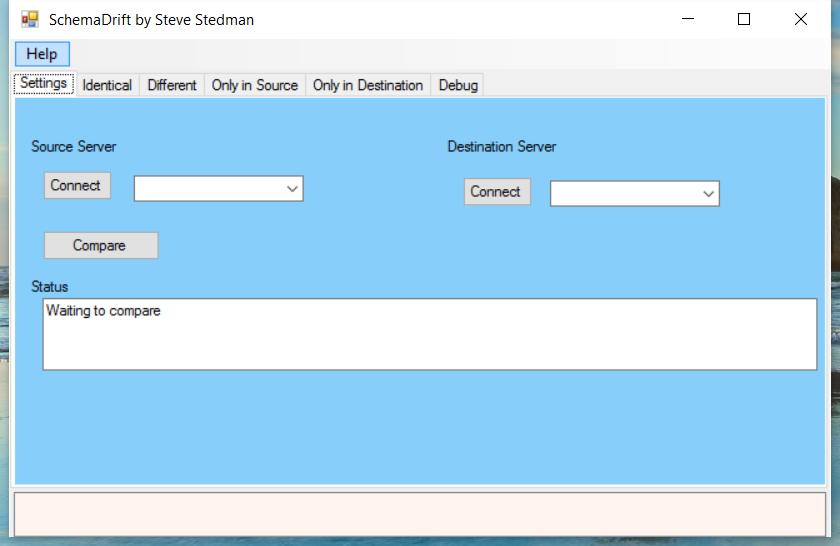
Next we click the connect button under the Source Server section. For the first server I am going to connect to a SQL Server 2008 R2 instance with SQL credentials.
Read More »SchemaDrift – Database Schema Differences – My Weekend Project
What 2015 meant to me and my business. Stedman Solutions, LLC – Startup After unexpectedly leaving a regular full time employment position on March 31st… Read More »2015 Review