
Join Types
Hi there, I’m Steve Stedman, and I’m excited to share with you my SQL Server course focused on SQL Server Joins, available at http://SteveStedman.com/joins. As an experienced database professional, I’ve designed this course to help you better understand the various types of SQL joins, and how they can be used effectively in real-world applications.
Welcome to SQL School, where mastering the intricacies of SQL Server joins becomes an achievable goal for everyone, regardless of experience level. As databases continue to be the backbone of modern applications, understanding how to efficiently retrieve and manipulate data is crucial. This blog post serves as an introduction to my comprehensive course that delves deeply into the world of SQL Server joins. Through detailed explanations and practical examples, you’ll gain the skills needed to tackle any complex query with confidence.
Joins are a fundamental aspect of SQL, enabling you to combine data from multiple tables in ways that extract meaningful insights and drive informed decision-making. Whether you’re aiming to advance your career in data analytics, enhance your software development skills, or simply expand your technical knowledge, mastering joins is an essential stepping stone. My course is designed to provide you with a clear understanding of the various types of joins available, including inner, outer, cross, and self joins, along with their practical applications. With real-world scenarios and hands-on exercises, you’ll not only learn the theory but also apply it to solve real problems.
One of the most fundamental skills when working with relational databases is understanding how to join tables together to retrieve the data you need. In this course, I’ll walk you through the ins and outs of SQL Server joins, including inner join, outer joins, left join, right join, and cross join.
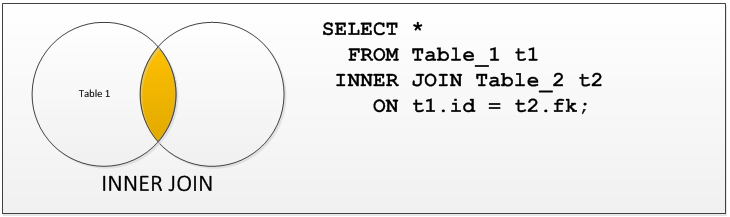
The inner join is perhaps the most common type of join you’ll encounter. It’s used to combine records from two or more tables where there’s a match based on a specified condition. This join returns rows from both tables that meet the criteria, excluding those that don’t.
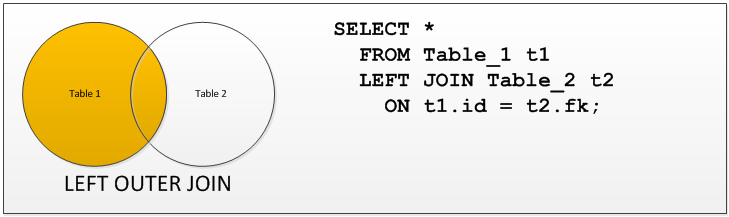
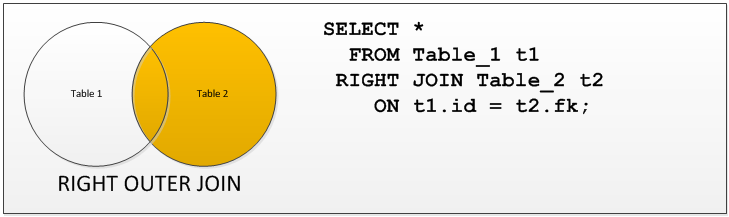
Next, we’ll explore outer joins, which come in many flavors: left join, right join, and full outer join. Left join retrieves all rows from the left table and the matching rows from the right table. If no match is found, NULL values are returned for the right table’s columns. Conversely, a right join returns all rows from the right table and matching rows from the left table, with NULL values for unmatched rows in the left table. A full outer join combines the results of both left and right joins, returning unmatched rows from both tables with NULL values in the columns where there’s no match.
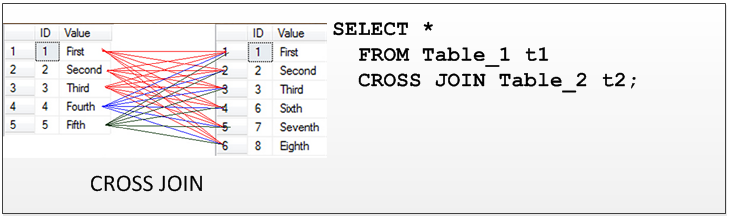
Then we’ll dive into the cross join. This join type produces the Cartesian product of two tables, returning every possible combination of rows from both tables. It’s often used in scenarios where you need to generate all possible combinations for a given set of data.
Throughout my SQL Server Joins course, you’ll find practical examples and exercises to help you better understand these concepts and apply them to your own projects. I’m confident that, by the end of the course, you’ll have a solid foundation in SQL Server joins and be well-equipped to tackle more advanced database challenges.
So, if you’re ready to master SQL Server joins, I invite you to join me at https://SteveStedman.com/joins. Let’s embark on this learning journey together!
Happy coding,
Other Classes and Related links
- Stedman SQL School
- Database Health Monitor Class
- Backup and Recovery Class – (Overview Video)
- JOIN Types class
- SQL DBA and Developer Interview Prep Course
- Corruption Repair Course – (Overview Video)
- SQL Server Performance Tuning class
- Youtube video with a overview of all our classes.
- Mentoring from Stedman Solutions.
- Need help, reach out for a free 30 minute consultation.
Find out more at my SQL School
“Continuous learning isn’t just about gaining knowledge, it’s about evolving as a person. Every lesson learned is a step towards becoming your best self.” -fortune cookie quote
More from Stedman Solutions:

Steve and the team at Stedman Solutions are here for all your SQL Server needs.
Contact us today for your free 30 minute consultation..
We are ready to help!