
Understanding TempDB Usage Patterns with “TempDB Use by Hour by Day” Report
As database professionals, we know that TempDB is one of the most critical components in SQL Server. It’s the shared temporary workspace for all sorts of operations, from user-created temporary tables and stored procedures to internal activities like sorting and hashing. However, monitoring its usage can be quite challenging. That’s where the “TempDB Use by Hour by Day” report from Database Health Monitor comes into play.
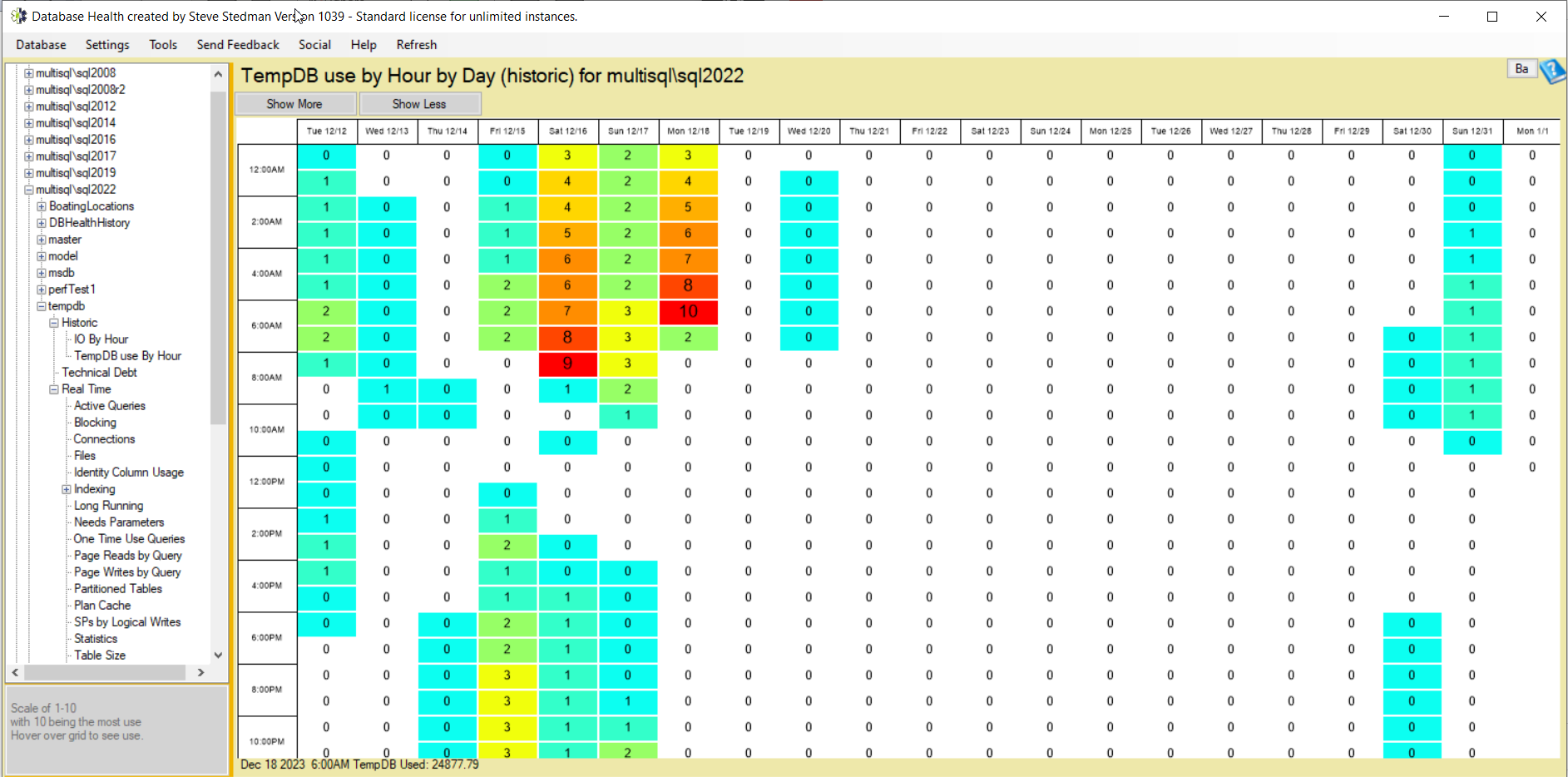
What is the “TempDB Use by Hour by Day” Report?
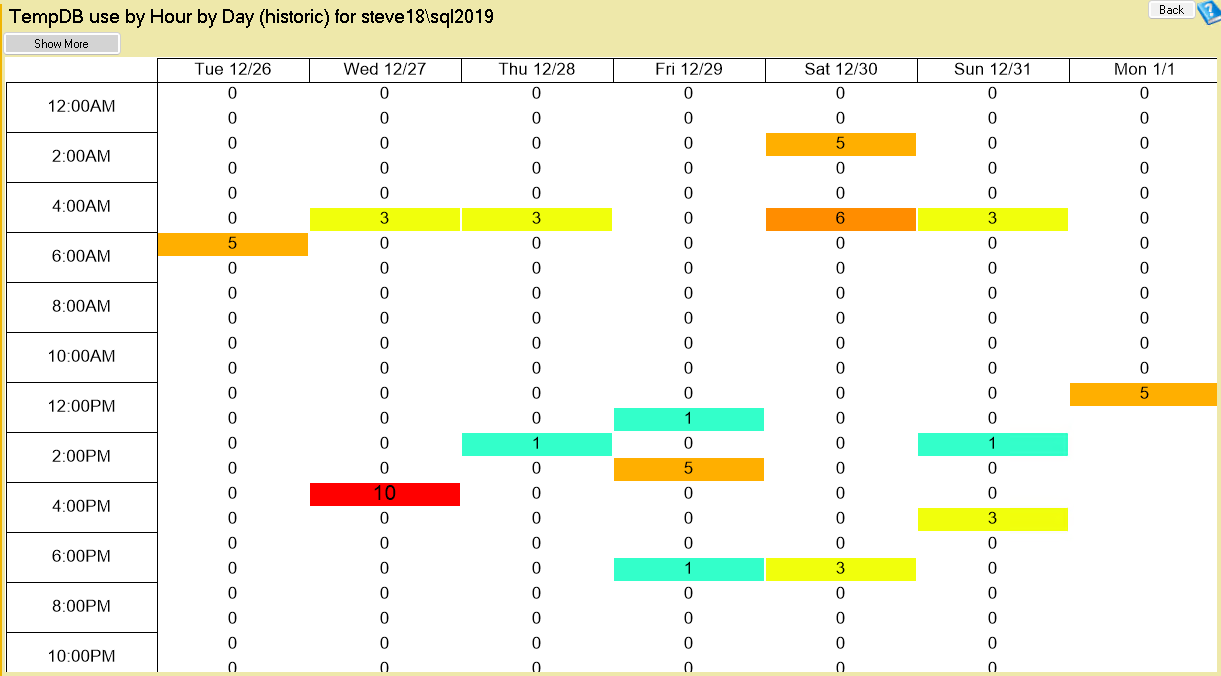
The “TempDB Use by Hour by Day” report is a comprehensive tool designed to provide a detailed look into how much TempDB is being used each hour of the day. This report is invaluable for identifying patterns, peak usage times, and potential performance bottlenecks related to TempDB. With this information, database administrators can make informed decisions about resource allocation, maintenance schedules, and performance tuning.
Key Features of the Report
- Hourly and Daily Breakdown: The report breaks down TempDB usage by hour and day, giving you a clear view of when the highest and lowest usage occurs.
- Usage Trends: Over time, you’ll be able to identify trends in TempDB usage. This can help predict future needs and plan for busy periods.
- Performance Insights: Understanding when TempDB usage peaks can correlate to performance issues. If certain operations slow down at specific times, TempDB might be a contributing factor.
How Can This Report Benefit You?
- Proactive Monitoring: By knowing when your TempDB is under the most strain, you can proactively monitor your system and prevent performance degradation before it impacts users.
- Capacity Planning: If you notice consistent growth in TempDB usage, it might be time to consider scaling up your resources or optimizing your queries and indexes.
- Troubleshooting: When facing performance issues, this report can quickly help you rule in or out TempDB contention as the culprit.
- Optimization: By understanding your TempDB usage patterns, you can schedule maintenance tasks during off-peak hours, ensuring minimal disruption to your services.
Uses of TempDB in SQL Server
The TempDB system database in SQL Server is a critical resource used to store temporary objects created by user queries and internal processes. When users execute queries that involve sorting, hashing, or joining large datasets, TempDB provides a workspace for intermediate results. For example, operations like ORDER BY, GROUP BY, or complex joins often spill into TempDB when the data exceeds available memory, ensuring query execution can proceed efficiently.
Beyond user-initiated tasks, TempDB supports SQL Server features like cursors, triggers, and temporary tables. Explicitly created temporary tables (e.g., #TableName) and table variables reside in TempDB, allowing developers to store and manipulate data for the duration of a session or transaction. Additionally, TempDB is essential for snapshot isolation and Read Committed Snapshot Isolation (RCSI), where it holds row versions to maintain consistency during concurrent transactions, enhancing performance in multi-user environments.
TempDB also plays a role in system-level operations, such as rebuilding indexes or managing the version store for features like Always On Availability Groups. Its usage extends to storing query execution plans and worktables for internal processes, making it a shared resource across all databases on a server. Because of its heavy reliance, TempDB performance and configuration—such as file placement and sizing—are vital to overall SQL Server stability and efficiency.
Why Choose Database Health Monitor?
Database Health Monitor is a tool I’ve personally developed to assist SQL Server professionals in monitoring and diagnosing performance issues. It provides a wide range of reports and real-time monitoring capabilities, including the “TempDB Use by Hour by Day” report. You can get started with it for free for a single server connection, making it an accessible option for individuals and small businesses.
Get Started with Stedman Solutions
At Stedman Solutions, LLC, we specialize in performance tuning and SQL Server optimization. If you’re facing challenges with TempDB or any other aspect of your SQL Server environment, our team is here to help. We offer a range of services, and you can also enhance your skills with Stedman’s SQL School classes. Learn more and get started today at https://Stedman.us/school.
Understanding your TempDB usage is just the beginning of optimizing your SQL Server performance. With the right tools and expertise, you can ensure your databases are running efficiently and effectively. Try out the “TempDB Use by Hour by Day” report in Database Health Monitor, and take the first step towards a more performant SQL Server environment.
More information on what is using your TempDB here: https://databasehealth.com/server-overview/tempdb-use-by-hour-by-day-historic/.

More from Stedman Solutions:

Steve and the team at Stedman Solutions are here for all your SQL Server needs.
Contact us today for your free 30 minute consultation..
We are ready to help!