Hello everyone! Steve Stedman here with another exciting update for Database Health Monitor. The February 2025 release (Version 1118) includes powerful new features, enhanced reporting, and important bug fixes to improve SQL Server monitoring and performance analysis. Let’s explore what’s new in this release.
Bug Fixes
We’ve resolved several key issues to enhance stability and compatibility, particularly for Amazon RDS SQL Server users:
- CheckDB Report Fix – The “Last Known Good CheckDB” report now correctly runs on RDS SQL Servers.
- Database Size Report Fix – The “Databases By Size” report now works as expected on RDS SQL Servers.
- File Utilization Report Fix – Resolved an issue preventing the “File Utilization” report from running on RDS SQL Servers.
- Connections Advisor Fix – Fixed a conversion bug in the Connections Advisor to improve accuracy.
New Features & Enhancements
Deadlock Tracking & Reporting
We’ve introduced comprehensive deadlock monitoring to help you analyze and resolve locking conflicts:
- Automated Deadlock Tracking – Deadlock data is now collected every 15 minutes.
- Deadlocks by Hour Report – Identify peak times for deadlocks within each database.
- Deadlocks by Object Report – Determine which database objects are most frequently involved in deadlocks.
- Deadlock History Report – View a running history of deadlocks for a given database.
- Deadlock Advisor – Provides detailed analysis of specific deadlocks to aid troubleshooting.
- Instance-Level Deadlock Reports:
- Recent Deadlocks Report – Displays a history of the most recent deadlocks.
- Deadlocks by Database – Highlights which databases experience the most deadlocks.
- Deadlocks by Hour – Shows when deadlocking is occurring at the server level.
Disk Latency Tracking
A new “Disk Latency by Hour” report has been added to help identify storage performance issues. This report provides:
- Historical Disk Latency Analysis – See trends over time to pinpoint when performance bottlenecks occur.
- Granular Insights – Understand disk response times at the server level, helping diagnose slow I/O performance.
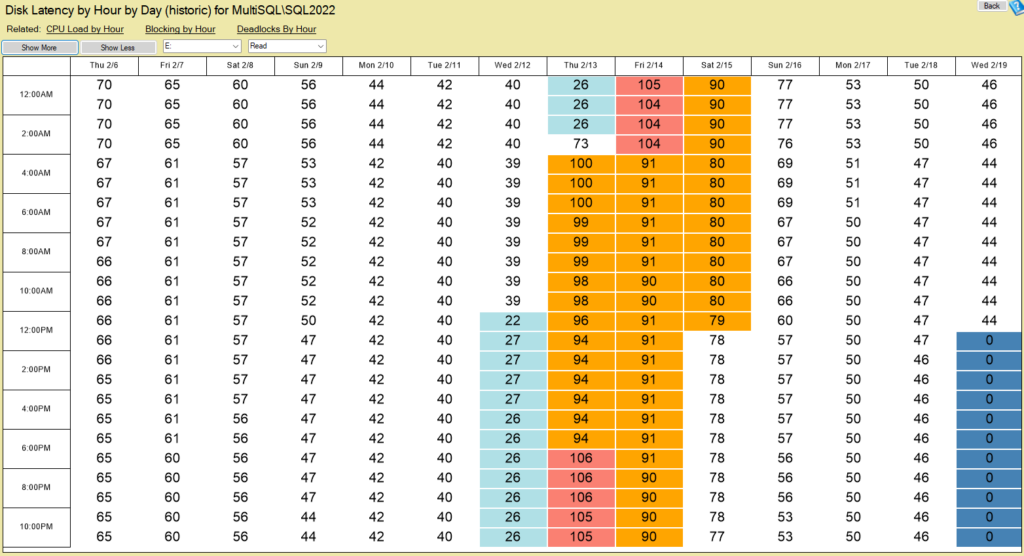
This new report gives database administrators deeper insights into storage performance, making it easier to detect and address potential issues.
SQL Server Email Alerting
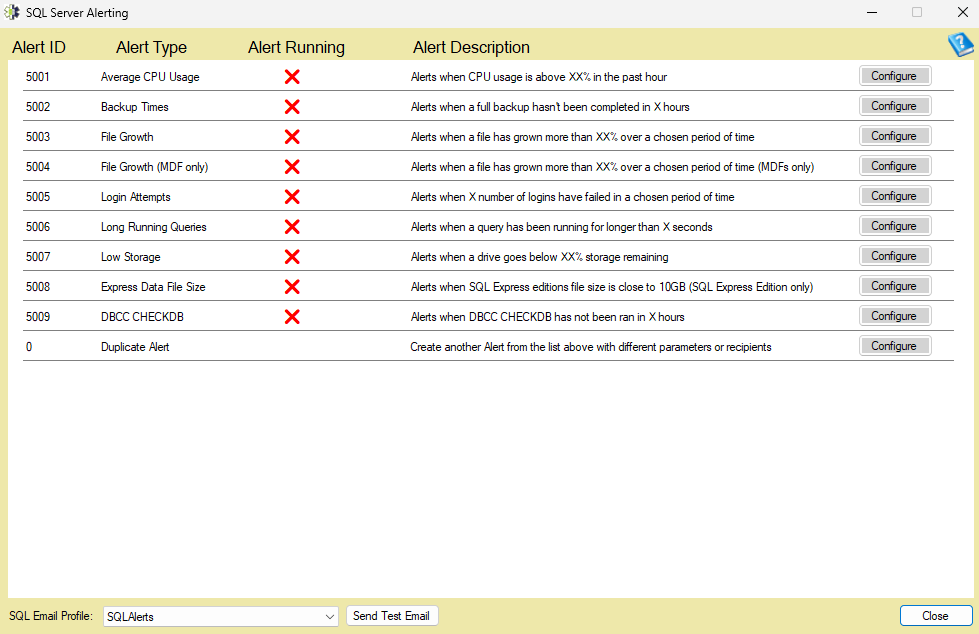
A new SQL Server Email Alerting tool is now available, allowing real-time email notifications for critical events. This feature can be accessed by right-clicking an instance name in the tree menu.
Learn more about SQL Server Email Alerting
New Instance Report: Email Alert Log – Provides a history of all email alerts sent by Database Health Monitor, including active alerts.
Improved Instance Reporting & Navigation
- “Related” Links on Instance Reports – Quickly jump between related instance reports for easier navigation.
- SQL Server Health Report – A summary report consolidating key instance-level metrics, with export options for HTML and Word.
- New “Replication Publishers and Subscribers” Report – Monitor replication activity across your SQL Server instance.
User Experience Enhancements
- SchemaDrift Integration – SchemaDrift now comes pre-installed with Database Health Monitor, with a new menu shortcut for quick access.
- Customizable Real-Time Charts – Users can now move and adjust real-time server overview charts. Right-click on a chart to reposition it.
- Active Queries & Blocking Reports Enhancements
- Double-click to Open Connection Advisor – Easily kill problematic sessions from the Active Queries and Blocking Reports.
- Copy Session IDs – Right-click to copy all Session IDs in Blocking Queries reports at both the instance and database level.
Infrastructure & Licensing Improvements
- New Licensing Server – The startup licensed user check has been moved to a more reliable server:
This change reduces outages and improves licensing validation.
Why Upgrade?
This release includes vital improvements in deadlock detection, disk latency monitoring, alerting, and overall SQL Server health analysis. Whether you’re troubleshooting database performance, managing replication, or optimizing queries, Database Health Monitor Version 1118 provides the tools needed to keep your SQL Servers running smoothly.
Download Now!
Ready to try the latest version? Download Database Health Monitor today:
DatabaseHealth.com
As always, we value your feedback! If you have suggestions or questions, feel free to reach out:
Contact Us
Happy monitoring!
— Steve Stedman
More from Stedman Solutions:

Steve and the team at Stedman Solutions are here for all your SQL Server needs.
Contact us today for your free 30 minute consultation..
We are ready to help!