SQL Server 2012 introduces 8 new analytic functions. This post will cover 2 of them LEAD and LAG, which can be used to reference a value in the row before or the row after the current row.
If you have read my OVER clause articles you will recognize the REVENUE table. Just a table listing department revenue year over year for 3 departments.
USE [Master];

IF EXISTS(SELECT name FROM sys.databases WHERE name = 'analytics_demo')
BEGIN
	ALTER DATABASE [analytics_demo] SET SINGLE_USER WITH ROLLBACK IMMEDIATE;
	DROP DATABASE [analytics_demo];
END
GO
CREATE DATABASE [analytics_demo];
GO

USE [analytics_demo];

-- same Revenue Table used in previous examples of the OVER clause
-- http://stevestedman.com/?p=1454

CREATE TABLE REVENUE
(
[DepartmentID] int,
[Revenue] int,
[Year] int
);

insert into REVENUE
values (1,10030,1998),(2,20000,1998),(3,40000,1998),
 (1,20000,1999),(2,60000,1999),(3,50000,1999),
 (1,40000,2000),(2,40000,2000),(3,60000,2000),
 (1,30000,2001),(2,30000,2001),(3,70000,2001),
 (1,90000,2002),(2,20000,2002),(3,80000,2002),
 (1,10300,2003),(2,1000,2003), (3,90000,2003),
 (1,10000,2004),(2,10000,2004),(3,10000,2004),
 (1,20000,2005),(2,20000,2005),(3,20000,2005),
 (1,40000,2006),(2,30000,2006),(3,30000,2006),
 (1,70000,2007),(2,40000,2007),(3,40000,2007),
 (1,50000,2008),(2,50000,2008),(3,50000,2008),
 (1,20000,2009),(2,60000,2009),(3,60000,2009),
 (1,30000,2010),(2,70000,2010),(3,70000,2010),
 (1,80000,2011),(2,80000,2011),(3,80000,2011),
 (1,10000,2012),(2,90000,2012),(3,90000,2012);

 --just double check the table to see what's there for DepartmentID of 1
 select DepartmentID, Revenue, Year
 from REVENUE
 where DepartmentID = 1;

-- Using LAG
-- http://stevestedman.com/?p=1513

select DepartmentID, Revenue, Year,
       LAG(Revenue) OVER (ORDER BY Year) as LastYearRevenue
 from REVENUE
 where DepartmentID = 1
 order by Year;
With LAG you can grab a value from the previous row, or previous value in the set as as set by the OVER (ORDER BY ) clause. 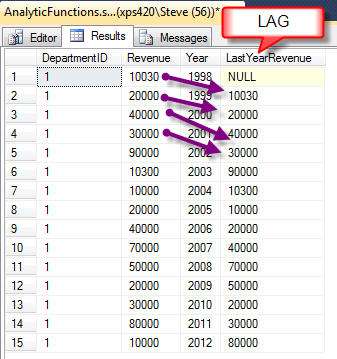
Now for LEAD which allows you to pull from the next row in your set.
select DepartmentID, Revenue, Year,
       LAG(Revenue) OVER (ORDER BY Year) as LastYearRevenue,
       LEAD(Revenue) OVER (ORDER BY Year) as NextYearRevenue
  from REVENUE
 where DepartmentID = 1
  order by Year;
Which produces the following output adding in a new column called NextYearRevenue 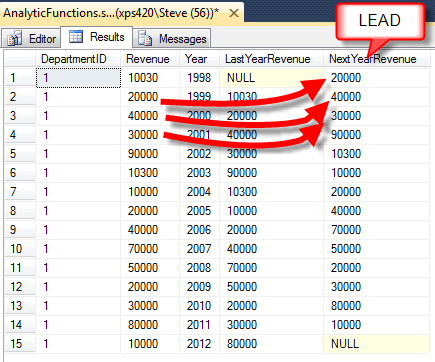
So far, this is pretty exciting as a way to grab a value from the previous year or next year. Now to use it!
Calculating the Year Over Year Delta in the revenue numbers. Sure you could do this with a CTE and a lot of recursion, but it is just so much easier using LAG.
--So how do we calculate the difference between last year's
-- numbers and this years numbers

select DepartmentID, Revenue, Year,
       LAG(Revenue) OVER (ORDER BY Year) as LastYearRevenue,
       Revenue - LAG(Revenue) OVER (ORDER BY Year) as YearOverYearDelta
  from REVENUE
 where DepartmentID = 1
  order by Year;
and here is what you get. 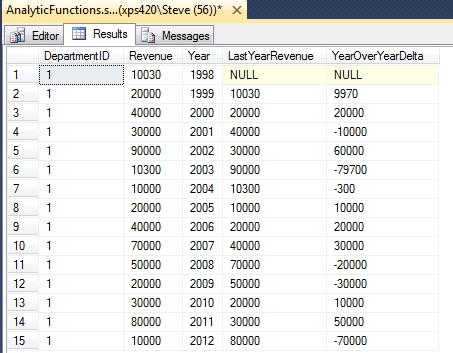
That’s it for LEAD and LAG, but keep in mind these are just building blocks for the analytic functions. More to come on the analytic functions in SQL 2012.
I hope you find LEAD and LAG in SQL Server as useful as I have. Just remember “Statistics can be made to prove anything—even the truth.”
More from Stedman Solutions:

Steve and the team at Stedman Solutions are here for all your SQL Server needs.
Contact us today for your free 30 minute consultation..
We are ready to help!