Building a SQL Restore Script When Your Backup Runs
It is handy to have a SQL Restore script ready to go for every backup that you run. Here is a script that will help… Read More »Building a SQL Restore Script When Your Backup Runs
It is handy to have a SQL Restore script ready to go for every backup that you run. Here is a script that will help… Read More »Building a SQL Restore Script When Your Backup Runs
While doing a recent server move, I came across the need to script all agent jobs and save them to a file so that if we needed to reference what was there after the move we could get at the agent jobs without having to restart the old SQL Server.
It made me realize that sometimes what you want to do is available in SQL Server Management Studio, but that perhaps it is not always entirely obvious.
In the example below, where I have four jobs (imagine if it was 150 jobs), I want to script all of them out and save them for future use.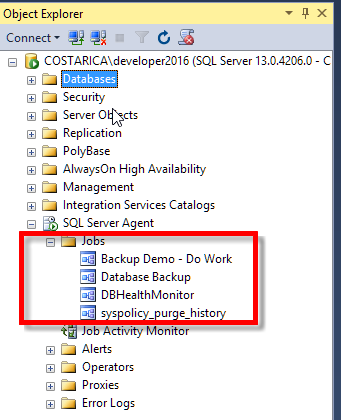
I could just right click on each one, choose “Script Job As, CREATE To, New Query Window”, which wouldn’t be that bad for 4 jobs, but assume you need to do this for 150 jobs, it could take you a while.
Read More »Script all Agent Jobs Using SQL Server Management Studio
Yesterday I had the opportunity to practice one of my sessions on Backup and Restore that I will be presenting at PASS Summit this year.… Read More »Backup and Restore – Pass Chapter Presentation
This is an update to Visualizing VLFs – A while back a wrote a blog post with a query to Visualize the VLF’s in your database. Today I have an update to that script.
The previously updated script added another column called “TextStatus” to the output to give you a better idea of what the different statuses mean. You now get 3 statuses shown, “In Use”, “Available”, and “Available Never Used”. The If you have lots of VLFs that are “Available Never Used” that may be an indication that your log file may be larger than you need. If you don’t have any that are “Available Never Used” the log may be smaller than you need.
This latest update changed the character shown in the bar chart to a X or an O depending on if the current file is in use.
Read More »Visualizing VLFs – Another updateSQL Server 2017 introduces a new column in the sys.dm_db_file_space_usage system table. The column is modified_extent_page_count, which tells how many pages have been modified in your data file since the last full backup.
SELECT *
FROM sys.dm_db_file_space_usage;

What is really interesting about this is that with a little math you can calculate the percentage of your data file that has been modified. This would be useful when running differential backups to be able to determine if it would make more sense to run a full backup or a differential backup. Basically when your differential backup gets large enough, based on the number of modified_extent_page_count pages, then it may make sense to do a full backup and reset this counter, and get back to smaller differential backups.
Here is an example
SELECT df.name, df.physical_name,
 total_page_count,
 allocated_extent_page_count,
 modified_extent_page_count,
 100.0 * modified_extent_page_count / allocated_extent_page_count as PercentChanged
FROM sys.dm_db_file_space_usage fsu
INNER JOIN sys.database_files df on df.file_id = fsu.file_id;

Now based on the Percent Changed column we can make some assumptions on the size of the differential backup, and decide if we want to do a differential backup or a full backup.
Read More »Determining how much of your data file has been modified
It appears to be my lucky day. Who would have thought that someone I don’t even know would want me to invest $48,000,000 for them. Wow it is so exciting.
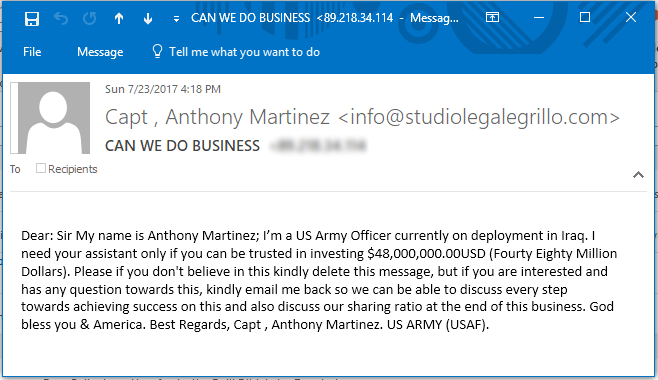
ok… now that I am through the sarcasm, I am just logging this to share some of the crazy scams that we come across every day. Sorry Anthony Martinez, but I am going to be unable to take you up on your scam, maybe one of the other recipients listed on the To: line will be able to help you.
In a perfect world, your SQL Server would be so secure that you would not need antivirus software, you would have behind layers of firewalls,… Read More »Using Antivirus with SQL Server

Over the years developing Database Health Monitor I have added a number of keyboard shortcuts to make life easier when working in the application. Some… Read More »Database Health Monitor Keyboard Shortcuts
I am excited to announce that 2 of the sessions that I proposed for PASS Summit 2017 have been accepted. This is the first year… Read More »2 Sessions Accepted for PASS Summit 2017
Today I released the June 2017 version of Database Health Monitor, you can get it on the download page at http://DatabaseHealth.com. Here is what it… Read More »Database Health Monitor June 2017 Version Released Today